The price of bitcoin typically varies slightly across different websites and exchanges at any given time, primarily due to the decentralized nature of cryptocurrency markets where each exchange operates as its own marketplace with its own supply and demand dynamics. (more…)
Category: Uncategorized
-
What if a seed plate is compromised?
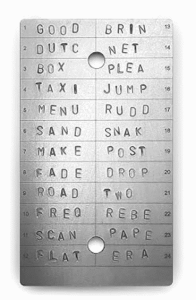
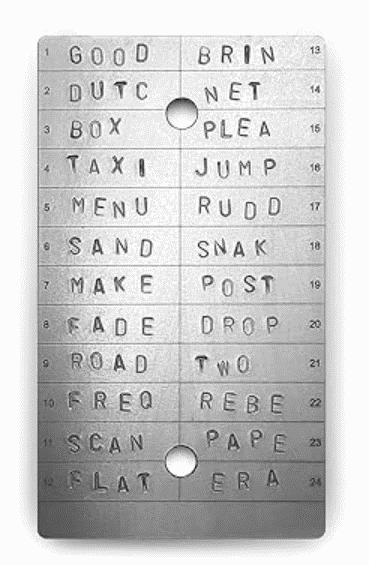
click to enlarge Recently I encountered a situation in which there was a possibility that a few words of one of my seed plates (example at right, not my real seed plates) might have been compromised. The likelihood was small, and only a few words (if any) were at risk. But to be on the safe side, I migrated to a new wallet. Briefly, this is what I did:
- I ordered some new seed plates;
- I installed a “hot wallet” on my smart phone;
- I transferred my bitcoin from my cold wallet (my hardware wallet) to the hot wallet;
- I wiped the settings on my hardware wallet;
- I created a new wallet on my hardware wallet (yielding a new seed phrase);
- I transferred my bitcoin from the hot wallet to my hardware wallet.
When the new seed plates arrive, I will stamp them with the new seed phrase, and I will put the seed plates into two safe places.
Here are the details of the migration. (more…)
-
Charging current for Trezor Safe 7
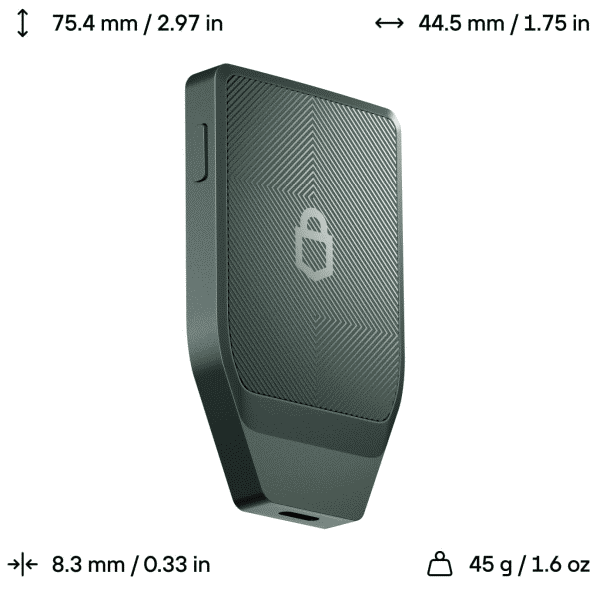
click to enlarge I have mentioned the Trezor Safe 7 wallet (seen at right) several times in this blog. Unlike most hardware wallets, it can run on an internal rechargeable battery. This, of course, means that the user will probably want to charge up the battery. The manufacturer provides two ways to charge up the battery:
- place the device on a Qi charging pad (wireless charging), or
- use a USB C cable.
I have used both ways, so I know that both ways work for the Trezor Safe 7.
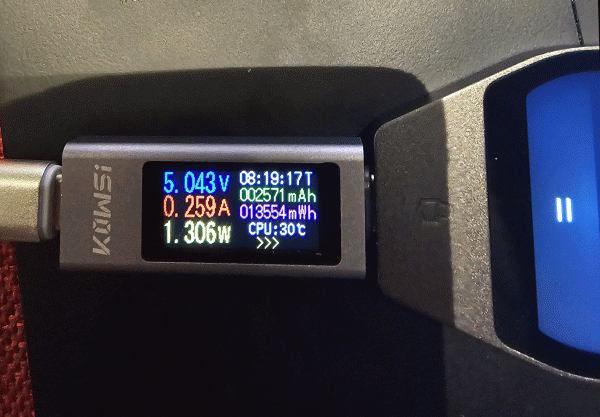
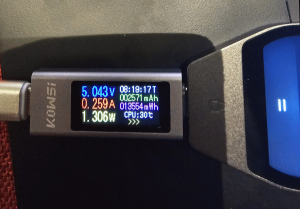
The natural question that arises is, how fast is the charging? As may be seen above, the wallet charges at about 1.3W.
The manufacturer says the battery is a 3.2V, 330mAh LiFePO₄ (Lithium Iron Phosphate) battery. This means the stored energy might be around 1Wh. We can thus estimate that if the battery were run way down, it might take 40 or 50 minutes to charge it up.
-
Recovering a bitcoin wallet?
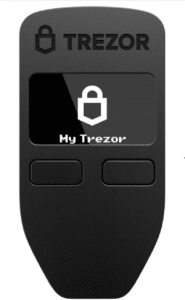
Trezor Model 1 I tried an experiment yesterday. The executive summary is that the $20 Trezor Model 1 is a failure as a way to recover a wallet that was created using a Trezor Safe 7.
Here are the details. (more…)
-
how to recognize the cryptocurrency from the address
Let’s suppose you have in hand some address to which cryptocurrency can be sent. You might wonder “which cryptocurrency can be sent to that address?” A chief reason that you might wonder is that if a person were to send an incorrect currency to a particular address, the result might be complete loss of the money. (more…)
-
Bitcoin ATMs
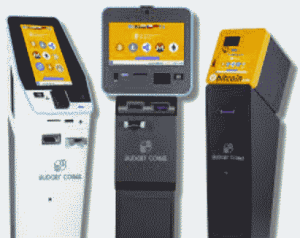 In recent passages through airports, I have noticed a few bitcoin ATMs. I am told that there are nowadays bitcoin ATMs in some 24-hour gas stations, convenience stores, liquor stores, vape shops and smoke shops.
There are, I suppose, two distinct ways that person might use a bitcoin ATM. One thing is you might have a bunch of cash in your pocket and you decide to try to get some bitcoin for it. The other would be that you have some bitcoin and you decide you would like to exchange it for cash. How might this work?
-
How do I send bitcoin to somebody else?
A main way that you can send bitcoin to somebody else is “through the chain”.
A second way that you might be able to send bitcoin to somebody else is through “bitcoin Lightning”. This “Lightning” only works if you have an account with some bitcoin exchange that supports Lightning, and it only works if the person to whom you want to send the bitcoin is using a bitcoin exchange that also supports Lightning. I have a small amount of bitcoin in Strike, so I could do this. I think most often when somebody uses Lightning it is to send some small amount of bitcoin.
If you are sending bitcoin to somebody “through the chain”, and if you have bitcoin in an exchange, then you could send it from the exchange. As mentioned above, I have a small amount of bitcoin in Strike, so I could do this. But for lots of reasons, this ought not to happen very often, because probably you should never leave any large amount of bitcoin in any exchange for any long amount of time. And if the amount of bitcoin you are sending is small, and if you are not very worried about privacy, maybe Lightning will be the best way to go.
Unless you are using Lightning, most often what you would probably prefer to do is send the bitcoin “from your hardware wallet”. This means that the entire transaction happens in a way that most people cannot see. It is not completely secret and anonymous, but it is mostly secret and mostly anonymous.
Here are some of the pros and cons of these three ways to send bitcoin:
how long it takes cost privacy Lightning as fast as lightning some amount of money not as private as chain-to-wallet chain from your exchange longer than with Lightning more than with Lightning not as private as chain-to-wallet chain from your wallet longer than with Lightning maybe a little more than with Lightning most private When you are sending bitcoin “on the chain”, you will be given the opportunity to pick how much money to pay for the transfer, and how fast you want it to get to where it is going.
Here are examples of recent choices that I was offered on Strike for sending bitcoin. In each case I list the amount of money I was getting ready to send (in equivalent dollars), and I list the fee (in equivalent dollars), and I list the fee as a percentage of the amount of money I was getting ready to send:
amount of money to send $10 $1000 fee for “priority” (10 minutes) $2.88 (28%) $25.14 (2.51%) fee for “standard” (1 hour) $1.75 (17.5%) $15.10 (1.51%) fee for “flexible” (24 hours) 0 0 As you can see, with Strike you can save a lot of money by being willing to accept the transfer being very slow. One “flexible” transfer took 12 hours. Another “flexible” transfer took 6 hours.
Here are examples of recent choices that I was offered in Trezor Suite for sending bitcoin:
amount of money to send $10 $100 $1000 fee for “priority” (10 minutes) $0.37 (3.7%) $0.29 (0.29%) fee for “standard” (30 minutes) $0.12 (1.2%) $0.13 (0.13%) $0.13 (0.013%) fee for “low” (1 hour) $0.02 (0.2%) $0.03 (0.03%) What’s interesting to see is that the fee offered in Trezor Suite seems to be only weakly affected by the amount of money being transferred.
When you are getting ready to send some bitcoin to somebody, one of the things that the recepient must do is provide an “address” to you. When the recipient is doing this, he or she could use the same address over and over again. But it is considered a best practice and is highly recommended to use a new address for each bitcoin transfer. It does not cost more money to create and use a new address. And it protects your financial privacy and, to a lesser extent, your security. So it is to your advantage to nudge the recipient to generate a new address for this transfer that you are getting ready to do.
It turns out that bad people will try to infect your smart phone or computer or web browser with malware that will try to intercept such outbound bitcoin. So you need to be really careful whenever you send bitcoin. Check carefully with the would-be recipient of the transfer, to make absolutely sure you know their “address” that the bitcoin is to be sent to. When you enter the “address” to which the bitcoin is being sent into your phone or computer, make absolutely sure the address is what it is supposed to be.
-
Experiment with features and transactions without using real bitcoin
I was astonished to learn of a thing called Bitcoin Testnet.
Bitcoin Testnet is a version of the bitcoin network where you can experiment with features and transactions without using real bitcoin. It is ideal for educators and anyone wanting to practice bitcoin operations safely. You can use the bitcoin testnet to practice bitcoin transactions, wallet recovery, and more advanced setups like multisig wallets without using real bitcoin.
You can get testnet coins from websites called faucets. These faucets send small amounts of testnet bitcoin to your address for free.
See a very helpful article about this on the Trezor web site.
-
What exactly do I need to do so that a person can send bitcoin to me?
A main way that a person can send bitcoin to you is “through the chain”.
A second way that a person might be able to send bitcoin to you is through “bitcoin Lightning”. This “Lightning” only works if you have an account with some bitcoin exchange that supports Lightning, and it only works if the person who wants to send you the bitcoin is using a bitcoin exchange that also supports Lightning.
A person who sends bitcoin to you “through the chain” can send it to you at your account at an exchange (if you have such an account, and if you choose to use it as your way of receiving the transfer).
Most often what you would probably prefer to do is receive the bitcoin “into your hardware wallet”. This means that the entire transaction happens in a way that most people cannot see. It is not completely secret and anonymous, but it is mostly secret and mostly anonymous.
Here are some of the pros and cons of these three ways to receive bitcoin:
Lightning chain to your exchange chain to your wallet how long it takes as fast as lightning longer than with lightning longer than with lightning cost some amount of money more than with lightning more than with lightning privacy not as private as chain-to-wallet not as private as chain-to-wallet most private Being smart about how to receive the bitcoin. When you are getting ready to receive some bitcoin from somebody, one of the things that you must do is provide an “address” to that person. When you are doing this, you could use the same address over and over again. But it is considered a best practice and is highly recommended to use a new address for each bitcoin transfer. It does not cost more money to create and use a new address. And it protects your financial privacy and, to a lesser extent, your security.
It turns out that bad people will try to infect the sender’s smart phone or computer or web browser with malware that will try to intercept such outbound bitcoin. So you need to beg the sender to be really careful whenever they are sending bitcoin to you. Check carefully at your end to make absolutely sure you know your “address” that the other person is going to use to sent the bitcoin to you. When the sender is entering the “address” to into their phone or computer, beg them to read it back to you, so that you can make absolutely sure the address is what it is supposed to be.
Fun feature in some hardware wallets. As discussed above, a very important part of receiving bitcoin on the chain is paying very close attention to the “address” that the sender uses to send the bitcoin to you. The wallet itself will determine the address, and will communicate it to the app that is running on your smart phone or notebook computer. One of the things to worry about is the possibility that somehow your smart phone or notebook computer might have been compromised in some way, perhaps with a bad person sneaking their own “address” onto the screen of smart phone or computer. So you are reminded to check to make sure the “address” shown on the wallet itself matches the “address” shown in the app.
Having said all of this, I will now try to describe the fun feature provided by some hardware wallets (including the Trezor Safe 7). At the moment that the address appears on the wallet, you can tap to make the wallet display the address as a QR code. Depending on whether the sender is in the same room with you or not, it might work out that the sender could simply scan the QR code from your wallet. If so, then this greatly reduces the risk of something going wrong with the address.
-
Learning how to do a few simple things with bitcoin
How might an average, everyday person put their toe into the shallow end of the swimming pool, learning how to do a few simple things with bitcoin?
A first step is to set aside a modest amount of money that will be used for the learning activity. The idea is to pick some amount of money that is small enough that you would not mind if things were to go completely wrong. I’d suggest maybe $50-100.
A next step is to pick a place where you will purchase some bitcoin, and where you will hold it for just a few days while you get ready for next steps.
At about the same time, place an order for a “hardware wallet”. This is a thing that you should not purchase “used”. You should purchase a brand-new hardware wallet, and you should purchase it directly from its manufacturer, or through some trustworthy retailer that is reselling directly from the manufacturer.
At about the same time, you should place an order for some very sturdy and reliable way of writing down and safely storing the twenty or so words of your “seed phrase”.
Let’s go through these steps in a bit of detail.
Pick a place where you will purchase some bitcoin, and where you will hold it for just a few days while you get ready for next steps. These places are called “exchanges”. I chose Strike but that does not at all mean that you must choose Strike.
The choices available for any particular would-be bitcoin experimenter will very much depend on where the person is located. I am in the US, and I picked Strike. Depending on where you are located, you might need to pick some other exchange.
Having chosen Strike, I then opened an account with Strike. They did several “KYC” (know your customer) things, including asking for a snapshot of a government ID and taking some selfies using my smart phone. This was on a weekend. The app said it would be a while before my account would be “active”. I sort of imagined it might take until a business day later (perhaps the following Monday) for some human review. But within an hour or two my account was “active”.
The next thing that I needed to do was to get some money into my Strike account. I clicked around in the app and found “bank details” to use for sending a money transfer. By “bank details” I mean a “routing number” and an “account number”. The routing number is an ordinary ABA routing number, in this case 021214891 which is Cross River Bank. The account number they gave me was a twelve-digit number which, I eventually realized, is unique to me as a particular Strike customer.
It means that if somebody were to send money to that account number and routing number, it really comes straight to my Strike account. But the company is a bit prickly about this. Because of Strike’s need to comply with KYC laws, Strike did not at all like it when (sort of by accident) the first transfer of funds to this bank account number happened to come from a business that I control, rather than from me personally. It took two days of messaging back and forth before they finally agreed to “approve” that inbound transfer. Once I realized this was apparently a problem, I did a money transfer from myself personally, and that got “approved” within about ten minutes. I immediately clicked to convert that money to bitcoin.
I also set up a payroll direct deposit so that a small (very small!) predetermined percentage of my paycheck would get sent to this Stripe account for each pay period. By chance I did this a few hours before a payday, and the money from my paycheck got credited instantly to my Strike account.
I clicked around in my Strike account to set it so that each time money came in from the payroll direct deposit, it would be automatically converted to Bitcoin. Strike’s policy is that such conversions do not incur any fee. (I have to assume that some sort of implicit fee gets earned through the exchange rate at which the conversion takes place.)
As mentioned above, the first transfer that I made to Strike had gotten held up for a couple of days. When Strike finally “approved” that transfer, I immediately clicked to convert that money to bitcoin.
After the passage of a few days, I had some bitcoin. What I had accumulated was roughly one-hundredth of a bitcoin. This was at a time in December 2025 when bitcoin was at around $85K, so it meant that I was in possession of about $850 worth of bitcoin.
Of course the actual value of any particular amount of bitcoin will go up and down from time to time. I tried not to get too wound up about noticing that my holdings had increased at one moment by $30, and then dropped in value by $40, and so on.
As I discuss elsewhere in this blog, the general view expressed by most people who have thought a lot about bitcoin is that what one should absolutely not do is “park” the bitcoin for any extended period of time in an exchange like Strike. The general view is that one should eventually transfer one’s bitcoin holdings (or most of one’s bitcoin holdings) to a “self-custody wallet” or “hardware wallet. I will describe this transfer later in some detail, but for now I will describe some next steps.
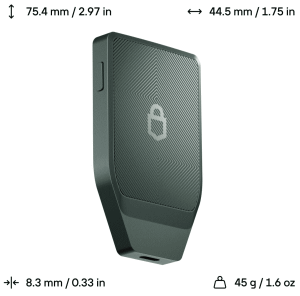
click to enlarge Place an order for a “hardware wallet”. This is a thing that you should not purchase “used”. You should purchase a brand-new hardware wallet, and you should purchase it directly from its manufacturer, or through some trustworthy retailer that is reselling directly from the manufacturer.
I selected the Trezor 7, seen at right. It cost $249, which is far more expensive than most hardware wallets. You can get a perfectly good hardware wallet for $20 (the Trezor 1, on sale). But I had decided to live it up with this very fancy Trezor 7.
The idea of a hardware wallet is that it is a very secure device that is never ever directly connected to the Internet, and that is very difficult to hack to get the information stored inside. The device connects (from time to time) with some other device that is connected to the Internet, such as a smart phone or notebook computer or desktop computer. You might be using an Android phone or an iPhone. You might be using a Windows computer or a Linux computer or an Apple computer. Lots of hardware wallets are made so that they can connect to any or most of those many types of devices.
A first thing to take into account when selecting a hardware wallet is whether it supports some particular cryptocurrency that you feel you must hold. It might turn out that the particular hardware wallet you were getting ready to purchase does not support that particular cryptocurrency. If so, then you have to strike this particular hardware wallet off your shopping list. (Every hardware wallet, without exception, supports bitcoin.) I think it is a really good idea to select a wallet that supports test bitcoins.
A second thing to take into account when selecting a hardware wallet is whether it is able to connect to the particular device you are planning to use a lot for your user interface. This might be an Android phone or iPhone or Windows computer or Apple computer or Linux computer. It might turn out that the particular hardware wallet you were getting ready to purchase is not able to connect to the kind of device that you prefer. If so, then you have to strike this particular hardware wallet off your shopping list. (A typical stumbling block is if your preferred device is an iPhone, because lots of hardware wallets fail to support iPhones.)
A third thing to consider is how much the hardware wallet costs. You can get a perfectly usable hardware wallet (the Trezor 1) for $20. The top-of-the-line hardware wallet (the Trezor 7) costs $249.
A fourth thing that some users will care about a lot is the level of transparency on the part of the maker. I personally prefer Trezor for many reasons, including that the firmware in the device is open-source and the crypto chips inside the device can be audited by a third party who does not need to sign an NDA to carry out the audit.
A fifth thing that some users will care about is the ability to use the device as a hardware security key for two-factor authentication (“2FA”) on various web sites. Hardware wallets that can do this include Trezor Safe 7, Trezor Safe 5, Trezor Safe 3, Trezor Model T, Ledger Nano S, Ledger Nano X, OneKey Pro, OneKey Touch, and OneKey 1.
What are the consequences of making what might later turn out to be an unwise choice of hardware wallet? For example what if Trezor were to go out of business tomorrow, without warning? What if the hardware wallet itself were to stop working without warning? The answer would be that you shrug and purchase another hardware wallet, perhaps from the same company or from a different company. You would then load your “seed phrase” (see discussion below) into it, and everything would be back to normal.
You could also ask “what if my hardware wallet gets run over by a truck?” or “what if it is accidentally destroyed in a fire?” Once again, you would shrug and purchase another hardware wallet, load your “seed phrase” into it, and yet again, everything would be back to normal.
This brings us back around to a bit of terminology. Yes, lots of people (including me) will sometimes talk about “transferring bitcoin to a hardware wallet” as a shorthand way of describing what is going on. But of course the bitcoin are not actually inside the wallet. What is inside the wallet is the stuff that makes it easy to gain access to your bitcoin. The wallet is not “a good place to store your bitcoin”. It is “a good place to store the things that give you access to your bitcoin”. Despite all of this, when we are in a hurry to use just a few words to describe what is going on, we will say things like “we need to transfer our bitcoin from an exchange to our hardware wallet”, and everyone needs to understand that that is merely a shorthand for things that take longer to say.
I actually made a decision to purchase a $20 Trezor 1 just to keep it around in case something bad were to happen to my Trezor 7. It will sit untouched, maybe for years, but it will be there if I need to put it into service.
Putting the wallet into service. The exciting next step is to put your hardware wallet into service. The manufacturer will (hopefully) have gone to a lot of trouble to make it easy for you to check that the device has not been tampered with on its way to you. The box might have holographic seals on it. The device itself might have a holographic seal over the USB port. When you power it up, the device would hopefully do lots of self-checks to maximize the chances that if it had been tampered with, you would find out about such tampering.
Probably the wallet arrives with no firmware in it. If there is already firmware in the wallet, that is cause for concern. But let’s assume that the normal situation presents itself, namely that no firmware had been previously installed in the wallet. You will then install firmware into the wallet.
Probably you will have a choice of installing bitcoin-only firmware on the one hand, or firmware that works with many cryptocoins. This is a matter of personal choice. Either path is just fine. I suggest the latter because this might (among other things) permit you to work with “test” bitcoins.
There will come a point in the setup process where you are given an opportunity to write down 12 or 20 or 24 words. You will only get one chance to see those words, so you need to be alert. You will write them down on a piece of paper. You will need to think of who is around you when you are doing this. Anybody who sees the words could steal your bitcoin.
You will have to think about where to put the piece of paper.
Sturdy and reliable storage of the “seed phrase”. As you can see from the discussion above, there is this thing called a “seed phrase” that is somehow very important. (This is your 12 or 20 or 24 words.)
In many ways the seed phrase is far more important than your user ID or password at an exchange like Strike. The reason is that (hopefully) you will never leave any large amount of money at an exchange for any long period of time. If you leave any amount of money at an exchange for a long period of time, it will be a small amount of money just for handy quick transactions for example using Lightning. If you ever somehow have some large amount of money in an exchange (perhaps because you just purchased a lot of bitcoin, or because you are getting ready to convert a large amount of money to cash), hopefully you will go to quite a bit of effort to minimize how long the money sits in the exchange.
In many ways the seed phrase is far more important than the choice of a particular hardware wallet, and is far more important than where you put the hardware wallet. Eventually, as you learn more and more about things like the hardware wallet and blockchains, you will appreciate that this “seed phrase” is something that you absolutely need to write down and save somewhere so that you can find it again later. Not only that, you probably need to store it in some way that would still be readable even if the place where you keep it were to be destroyed by fire. Not only that, you probably need to store it in some second location.
And you really need to store your seed phrase in a place (or more likely, in places) that most people won’t see. Maybe in a safe, maybe taped to the bottom of some furniture, maybe in a book on a shelf.
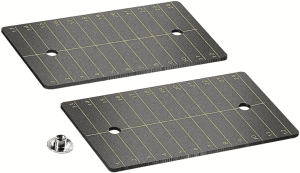
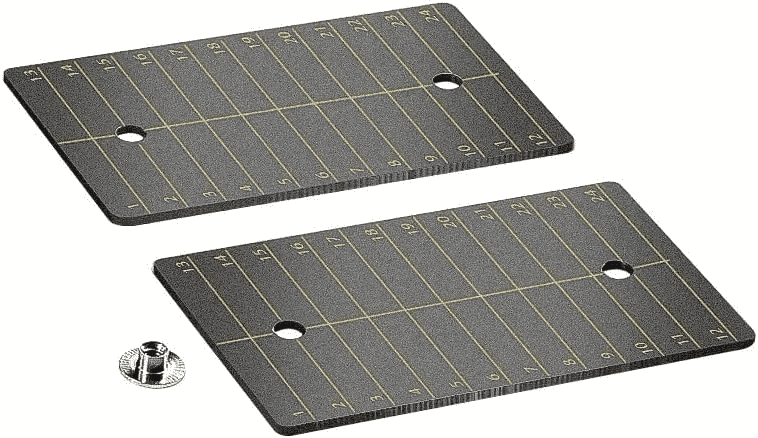
click to enlarge Storing the seed phrase. To safeguard my words, I chose to use cards made of titanium, shown at right. These cards are about 2½ inches by 4 inches, and are about the thickness of a credit card. A set of two such cards was about $19 on Amazon.
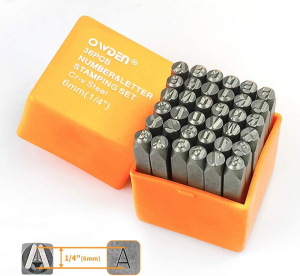
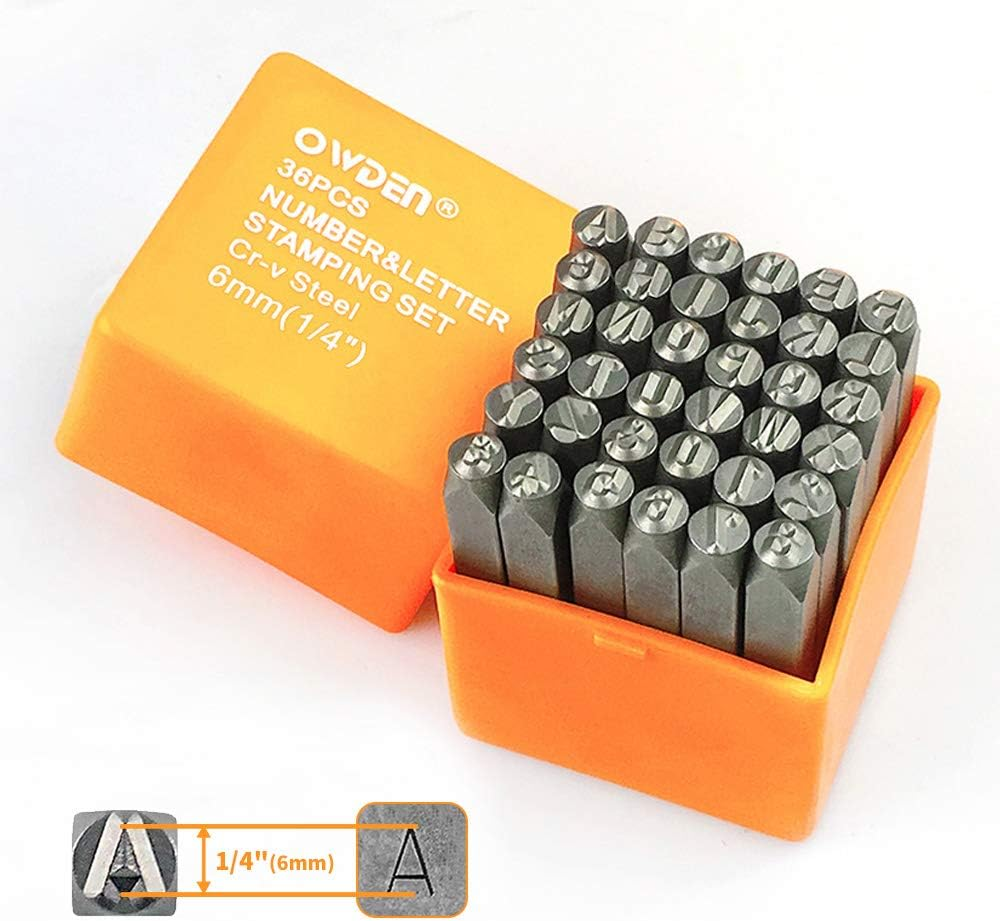
click to enlarge I also purchased a stamp set, shown at right, which cost about $20 on Amazon. The stamps make letters about ¼ inch tall.
click to enlarge I used a heavy mallet to stamp my 20 words into 20 numbered places on the cards. (At right you can see a photo of a stamped seed card that somebody posted on the Internet.) I then stored my cards in various places.
A super important thing is to pay a lot of attention to who is around you when you stamp the words onto the cards. Anybody who sees the words could steal your bitcoin.
People who think a lot about this stuff have lots of ideas about where to put such cards. Maybe bury a card in the ground somewhere, with the idea of digging it up later if it is ever needed. Maybe duct-tape it to the bottom of a piece of furniture. Hide it in a book. Send one of them to a trusted relative or friend. By far the most important thing is to realize that anybody who sees the seed words could steal your bitcoin.
After a while one catches on that there is no choice but to think about what happens if one gets run over by a truck. Perhaps one of the cards needs to be tucked away somewhere that would be found by a loved one or descendant in the event of one’s demise.
A main point of all of this is that while the user ID and password for an account with an exchange like Strike is maybe slightly important, it does not actually matter so very much (assuming that you have the self-control not to “park” a lot of bitcoin at the exchange). The physical location of the hardware wallet, the brand and model of the wallet, yes they are maybe slightly more important, but again they are not nearly as important as one might think. (The wallet will be protected by a PIN number, most wallets are made so that if somebody tries a dozen or more wrong PINs, the wallet will erase itself.) No, the one thing that really requires some thought is where to store the seed phrase, and how to keep prying eyes away from the seed phrase, and how to safeguard the seed phrase so that even if a building were to be consumed by fire, it would be possible to regain the seed phrase by sifting through the ashes of the burned-down building.
Oh and whatever you do (says everyone who has thought about this a lot), never ever put the seed phrase anywhere that is in a computer or on a smart phone or on a USB drive or in a place that might be stored to a cloud. Do not take a photograph of the piece of paper upon which the seed phrase was written down. Never put the seed phrase in any device that could ever possibly connect to the Internet.
You can find lots of places on the Internet where people compare notes on how to avoid being stupid about this. Use an aluminum card instead of titanium? Absolutely not, say lots of folks, because in a fire, an aluminum card will likely melt into an unrecognizable blob. Same thing for brass or copper, which would likewise melt into an unrecognizable blob. Steel? No, steel can rust, and might be rendered unreadable by a hot enough fire? Stainless steel? Maybe. If you click around to see discussions of this topic, you will find that there are several types of stainless steel, and lots of folks have strongly held views as to which type of stainless steel would be better than another. But lots of people think titanium is better than stainless steel. It turns out that titanium has a higher melting point than steel, which in turn has a higher melting point than aluminum. Titanium is also lighter in weight than steel.
This is a good time to mention that what you really ought to do is learn how to check to see whether the twenty words that you wrote down are correctly written down. In your wallet, there is probably a place where you can click to start a process in which you enter all twenty words into the wallet, one by one. And at the end of the process, the wallet tells you whether those were the correct twenty words. It is smart to do this once or twice in your first few days of getting accustomed to the wallet. But it is also smart to do this every few months, just to reassure yourself that you do know where to find the titanium card, and that nobody swapped it with some other titanium card. This all sort of sounds silly or paranoid, but the plain fact is that the only thing that matters is the seed phrase.
Transferring the bitcoin from the exchange to the hardware wallet. The stickler for accuracy will point out that the bitcoin do not actually end up in the wallet. The bitcoin are “somewhere out there” in some blockchain nodes that you will never see or touch but that really do contain the bitcoin, and the nodes also contain lots of data that establish that you are the owner. But it will seem as though the place where you are sending the bitcoin is into your newly purchased and configured wallet. So sometimes a person might talk about “transferring bitcoin from an exchange to a wallet”, and if they say this, we know that what they really mean is that what is being transferred to the wallet is “access to the bitcoin”.
And of course you may have selected an exchange that is not Strike. I am using the example of Strike because that is the exchange I chose. What we are talking about is transferring your bitcoin from the exchange that you selected, into the hardware wallet that you selected. (Except yes, we know that it is not really going into the wallet. We have now said this five times so far in this article. Fine, be a stickler for detail!)
What I will suggest is, start by transferring a small portion of your bitcoin from your exchange to your wallet. Stand back and watch what happens, and eventually you can arrive at some level of confidence that you succeeded at the transfer. Maybe transfer some of that bitcoin to a friend, and have the friend transfer it back to you. Next, set up your wallet to handle “test” bitcoin and talk a friend into doing the same with their wallet. And do a bunch of sending and receiving “test” bitcoin so that you get arrive at some level of confidence that you know how to avoid making mistakes when sending and receiving bitcoin.
Then do an experiment. Click around in the wallet to restore it to its factory default settings. This will of course be very scary, because you sort of worry that this might mean that you lose your bitcoin! Having emptied out your wallet, then click around in the wallet to restore the seed phrase. By this we mean “enter the seed phrase into the wallet”. See with your own eyes that once again you have access to your bitcoin.
I was astonished to learn that you can use “test” bitcoins to practice all of these things. See this blog article about “test” bitcoins.
After all of this, then maybe transfer nearly all of your bitcoin to the wallet. (You will probably want to leave a small portion of your bitcoin with the exchange, because the exchange will be a handy way to do small and inexpensive and fast transfers using “bitcoin Lightning”.) This transfer will be scary, but it is an important thing to do.